UTM Tags for QR Codes: Get Print Credit in Google Analytics
Scans from your flyers usually land in Google Analytics as Direct traffic. Here's how to tag QR codes so print gets credit, and three ways the tags get lost.
ZetaQR Team
Verified Contributor
In short: add UTM tags to the QR code's redirect, not to the printed link, so they're attached at the moment someone scans. Keep every value lowercase, pick one medium for all your print and stick to it. Then check that your own site doesn't throw the tags away. In our test, tags survived four of eight common setups untouched, got overruled in one and vanished completely in three.
Why Your Flyer Shows Up as Direct Traffic
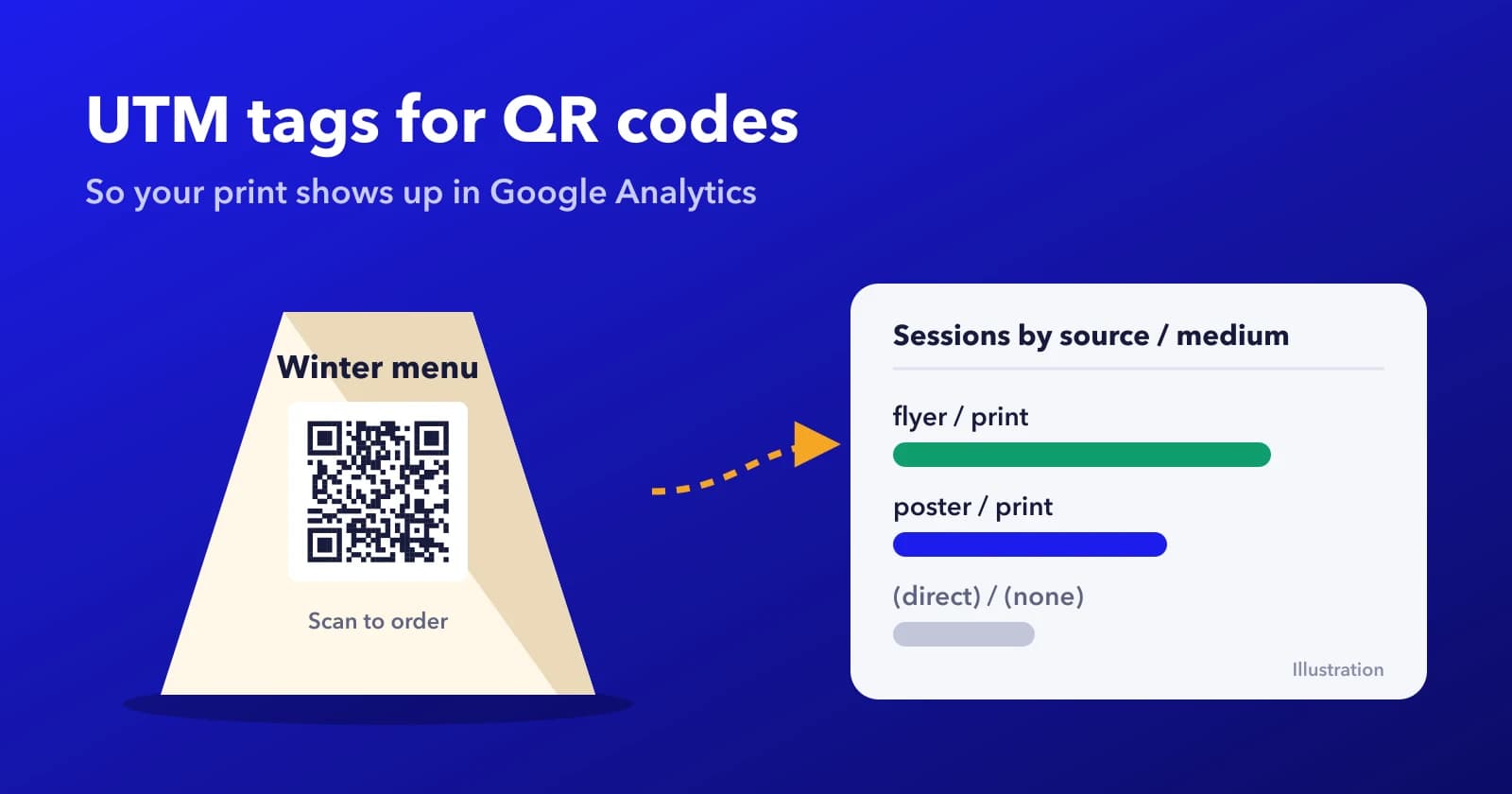
Say you print 2,000 table tents for a winter menu and put a QR code on each one. A month later you open Google Analytics to see how they did. There's no row for the table tents. There's just a bigger Direct number than usual.
That's not Analytics being lazy. When someone scans with the phone's camera, the browser opens your page without a referrer, because nobody clicked a link on another website. With nothing to go on, Analytics files the visit under (direct) / (none), the same bucket as someone typing your address from memory or tapping a bookmark.
UTM tags fix that. They're the utm_source, utm_medium and utm_campaign bits on the end of a URL, and Analytics reads them to label the visit. Google's own guide to campaign URLs covers the five parameters. For print you'll mostly use three, sometimes four.
Where the Tags Should Live
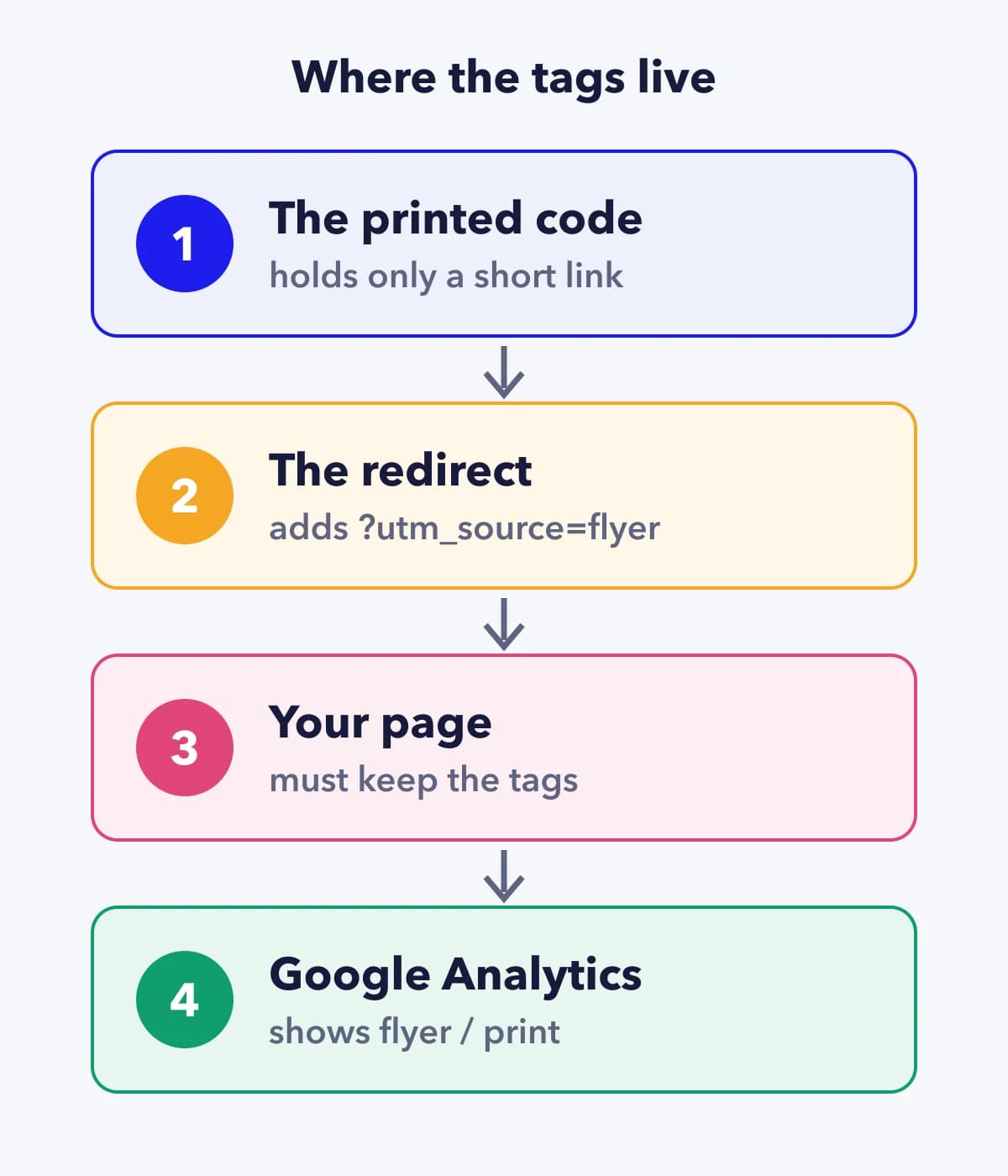
You could paste a fully tagged URL into a QR generator and print that. It works. But the tags are now baked into the ink, typos and all, and a long URL makes a denser code (we covered why in our static vs dynamic printing guide).
The cleaner way is to print a short code and add the tags at the redirect. With ZetaQR dynamic QR codes, you fill in the UTM Campaign Tracking fields on the code, and our redirect adds them to your destination URL each time someone scans. If you spot a typo in March, you fix the field. The 2,000 table tents don't need to know.
One detail from how our redirect works, because it matters later. If your destination URL already has a utm_source or another UTM in it, we keep yours and don't overwrite it. That's deliberate (it lets you set a tag by hand when you need to), but it can bite you, as the test below shows.
What to Put in Each Tag
Source is where the scan came from: flyer, table-tent, shop-window, pack. Medium is the type of channel, and for anything printed you want one word you'll use every time, such as print. Campaign is the reason the thing exists: winter-menu-2026. Content is optional and handy when one campaign has several placements, say table-tent vs menu-board.
Two things trip people up. First, Analytics treats capital letters as different values, so Flyer and flyer become two separate rows. Google says so plainly in the guide linked above. Write everything in lowercase, with hyphens instead of spaces.
Second, there's no built-in Print or Offline channel. We checked Google's default channel group rules, and a medium of print or qr doesn't match any of them, so those visits land in Unassigned. That sounds bad, but it isn't. Your source and campaign are still there, and a report by source / medium shows flyer / print just fine. If you want Print as its own line in the channel report, you can add a custom channel group in Analytics that matches your medium.
And pick one medium. If half your codes say print and the other half offline, you've split your own report in two.
We Sent One Code Through Eight Setups
Tags only count if they arrive. So we wanted to see what happens to them between the scan and the page, in the situations a real website throws at them.
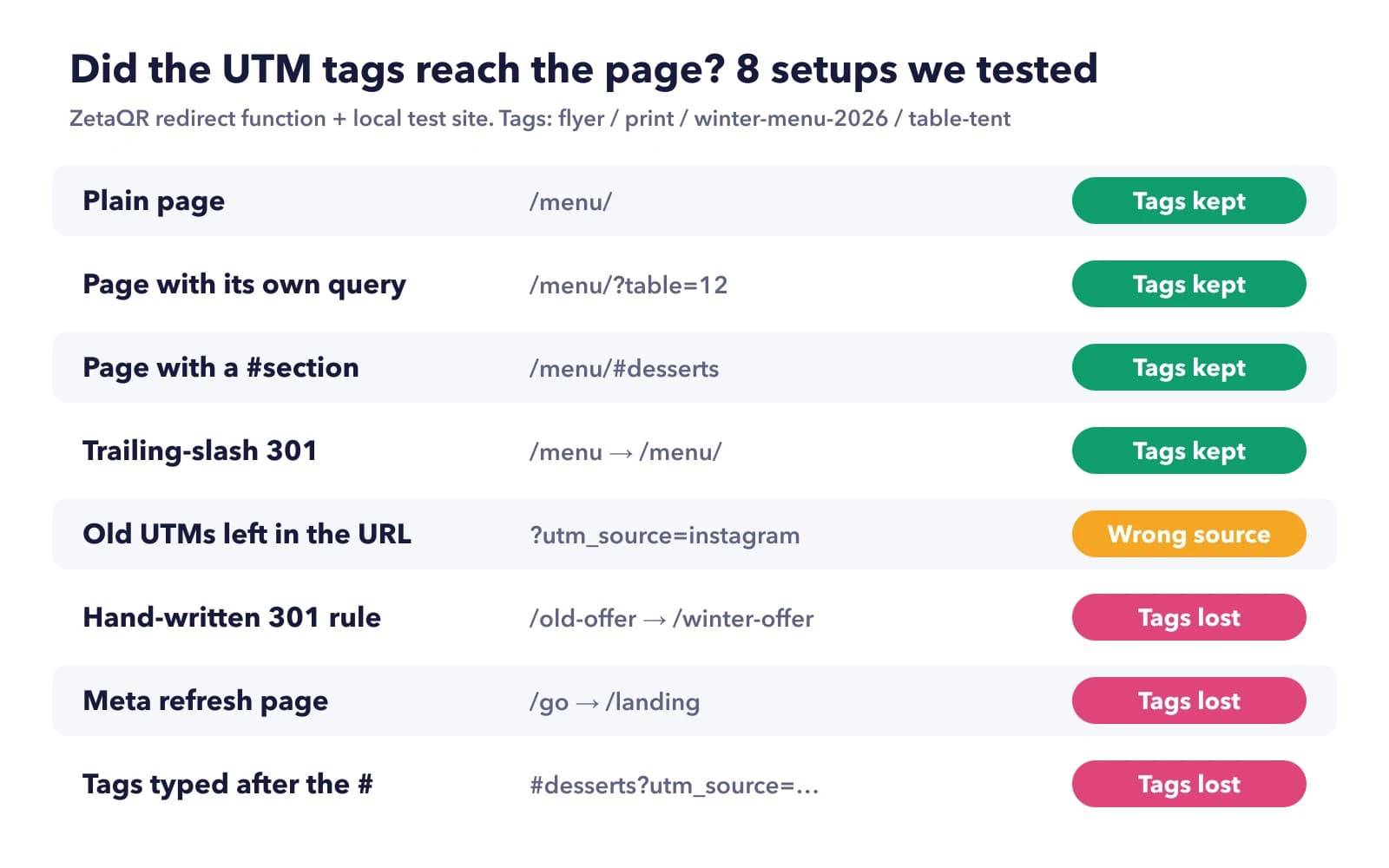
Here's how we did it. We took the same function our production redirect uses to add UTM tags and ran it on a local machine, in front of a small test website we built. Every code carried the same four tags: source flyer, medium print, campaign winter-menu-2026, content table-tent. We pointed it at eight different destinations, each one copying a habit we see on real sites, followed every redirect to the end, then checked which tags were still in the address the page finally loaded.
Four setups were fine. A plain page, a page that already had its own query (?table=12), a page link ending in #desserts and a site that adds a trailing slash with a 301 redirect all kept every tag. The #desserts one is worth a second look. The tags were placed before the #, where they belong, and the page still jumped to the desserts section.
The other four weren't. One credited the wrong source, and three lost the tags entirely.
Three Ways the Tags Go Missing
Old tags already sitting in the destination
This one is sneaky, because nothing looks broken. The destination URL had been copied from an Instagram bio link and still ended in ?utm_source=instagram&utm_medium=social. Since our redirect doesn't overwrite tags you've set, the final page arrived as instagram / social, with our campaign and content tacked on. Every table-tent scan would have counted as an Instagram visit. Before you save a destination, look at the end of it. If you see utm_, delete that part.
Your own site's redirects
A redirect rule written as "send /old-offer to /winter-offer" dropped everything after the question mark. So did a page that forwarded visitors with a meta refresh. Neither showed an error. The visitor got the right page, and the tags just weren't there anymore. If your destination redirects anywhere, link straight to the final address instead, or ask whoever runs the site to keep the query string on that rule.
Tags typed after the #
Someone tagged a link by hand and put the tags after the section anchor: /menu/#desserts?utm_source=flyer. To a browser, everything after # is the fragment. It isn't a query string, it never gets sent to the server, and Analytics doesn't look there for campaign tags. Our check found no tags at all. If you add tags by hand, they always go before the #.
What UTM Tags Won't Tell You
We sell the redirect that adds these tags, so here's the part we'd rather skip.
Your scan count and your Analytics sessions won't match, and that's normal. Our scan analytics count the redirect itself, which happens before your page loads. Analytics only counts a visit if its tag runs on your page. Anyone who declines your cookie banner (depending on how your consent setup is configured), uses a content blocker, or closes the tab before the page finishes loading may be a scan with no session. Expect Analytics to be the lower number. Use it for what people did on the page, and the scan count for how many people scanned.
UTMs also can't tell you who scanned or which flyer in the stack they picked up. They label a group of scans. If you need to compare placements, give each one its own code, which is easier to manage when they sit together in a QR campaign.
And if you only want to know whether anyone scanned at all, you may not need Analytics tagging. The scan count tells you that already. Tags earn their keep once you care what people did after they arrived, like whether they ordered, booked or signed up.
A Quick Tag Check Before You Print
Takes five minutes, and it's much cheaper than finding out in January:
- Source, medium and campaign filled in, all lowercase, hyphens for spaces.
- The same medium you used on every other printed code.
- No leftover
utm_in the destination URL. - Destination is the final address, not one that redirects again.
- Scan the proof, look at the address bar on your phone, and confirm the tags are there before the
#if there is one. Then check the Realtime report in Analytics while you're still holding the proof.
Frequently Asked Questions
Why does Google Analytics show fewer visits than my QR scan count?
Because they count different things. A scan is counted at the redirect, before your page loads. Analytics only records a session if its tag runs, so declined cookie banners, content blockers and people who close the page early all widen the gap. Some difference is expected. A sudden big one is worth checking for a redirect that strips the tags.
Should utm_medium be qr or print?
Either works, since neither matches a built-in channel and both end up in Unassigned. What matters is using the same one on every code. We'd pick print, because it groups QR codes with anything else you print, like a short link on a receipt.
Can I change the UTM tags after the code is printed?
On a dynamic code, yes. The tags are added at the redirect, so you edit the fields and the next scan uses the new values. Scans that already happened keep their old labels in Analytics. On a static code the tags are part of the printed pattern, so changing them means reprinting.
Do UTM tags make the printed QR code bigger?
Not on a dynamic code, because the printed pattern only holds the short link. If you bake a fully tagged URL into a static code, every extra character adds to the pattern, and the squares get smaller at the same print size.
Will people see the tags in the address bar?
Yes. After the redirect, the full tagged address is what the browser loads, so anyone who looks will see it. That's another reason to keep values short and readable, like winter-menu-2026 rather than an internal code nobody outside your team understands.
Tag One Code and Scan It
Pick the code you're printing next, fill in its three tags, and scan a proof with your phone. If the tags are in the address bar and the visit shows up in Realtime, you're done. If not, you've found the leak before the print run instead of after it.
Related Topics
- #qr-code-utm-tags
- #qr-code-google-analytics
- #ga4-qr-code-tracking
- #print-campaign-attribution
- #utm-naming-convention
ZetaQR Team
EditorialWriting on dynamic QR code technology, physical-to-digital attribution, and print campaign telemetry at ZetaQR.