Why Your QR Scan Count Isn't the Number of People
A QR scan count tracks how often a link was opened, not who opened it. We ran 20 test scans through our own counter to see where it runs high and low.
ZetaQR Team
Verified Contributor
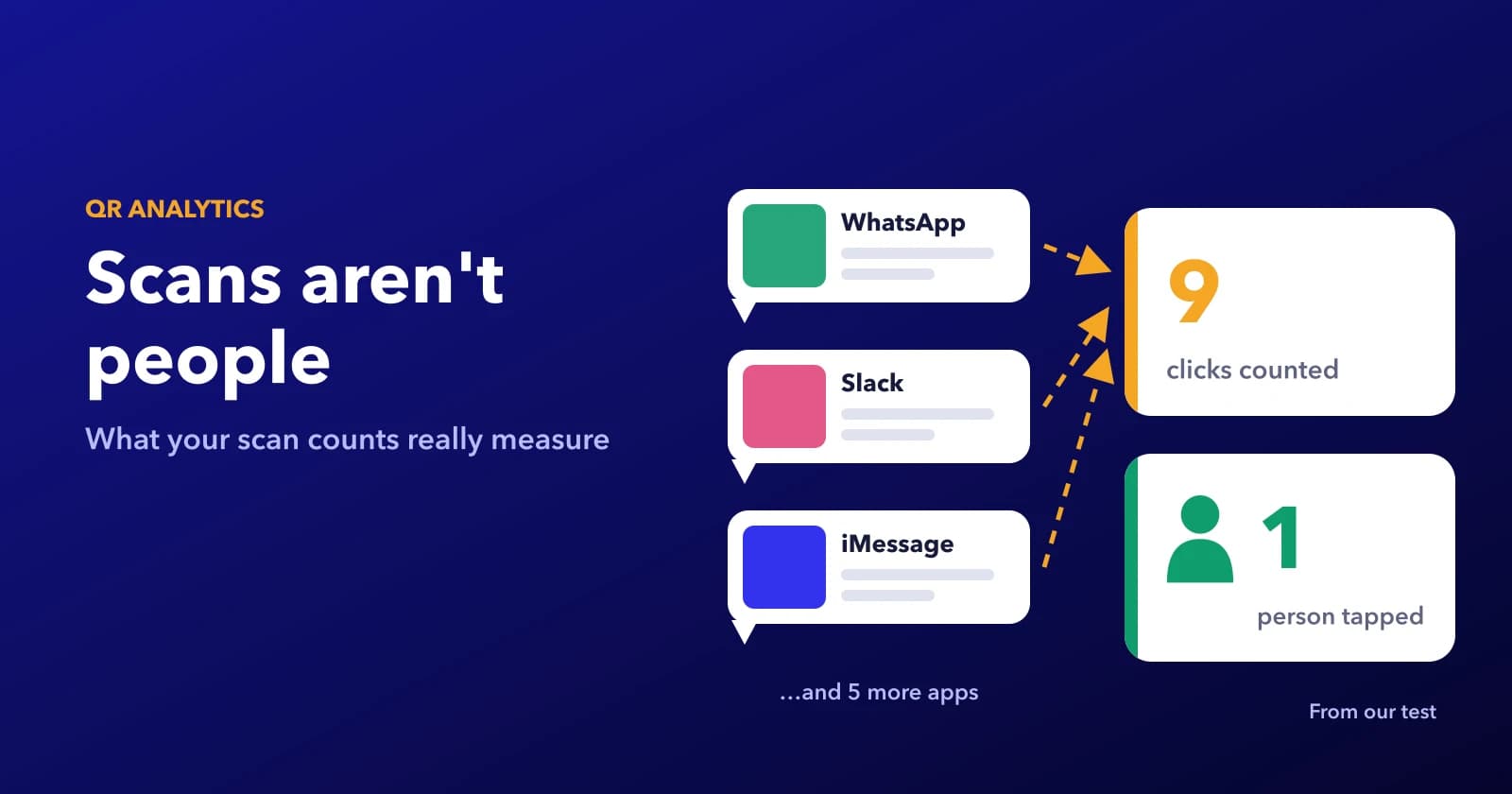
In short: total scans counts how many times your code's link was opened, and unique scans counts how many different internet connections opened it. Neither one counts people. In our test, five people sharing one café Wi-Fi showed up as one unique scan, one person switching to mobile data showed up as two, and a single short link pasted into eight chat apps logged nine clicks from one actual human. The numbers are still useful. You just have to read them as trends, not headcounts.
What a Scan Actually Is
When a phone opens a dynamic QR code, it doesn't go straight to your page. It asks our redirect where to go first, and that request is what gets counted. One request, one scan. The redirect never sees a face, a name or a phone number. It sees an IP address, the browser's user agent string ("iPhone, Safari") and the time.
So total scans in your ZetaQR analytics is the number of requests. Unique scans is the number of different IP addresses those requests came from in the period you're looking at. That's a reasonable stand-in for people most of the time. But an IP address belongs to a connection, not a person, and connections get shared and swapped all day.
It also means anything that opens the link counts, whether it's a person or not. We'll get to that.
We Sent 20 Test Scans Through Our Own Counter
We wanted real numbers rather than guesses, so we tested our own product. On a local copy of ZetaQR running the same redirect and analytics code as production, we made four test QR codes and one short link, all pointing at a page on example.com. Then we sent 20 requests to them, each with the user agent string a real phone or app sends, and each from an IP address in the ranges reserved for documentation, so no real network was involved.
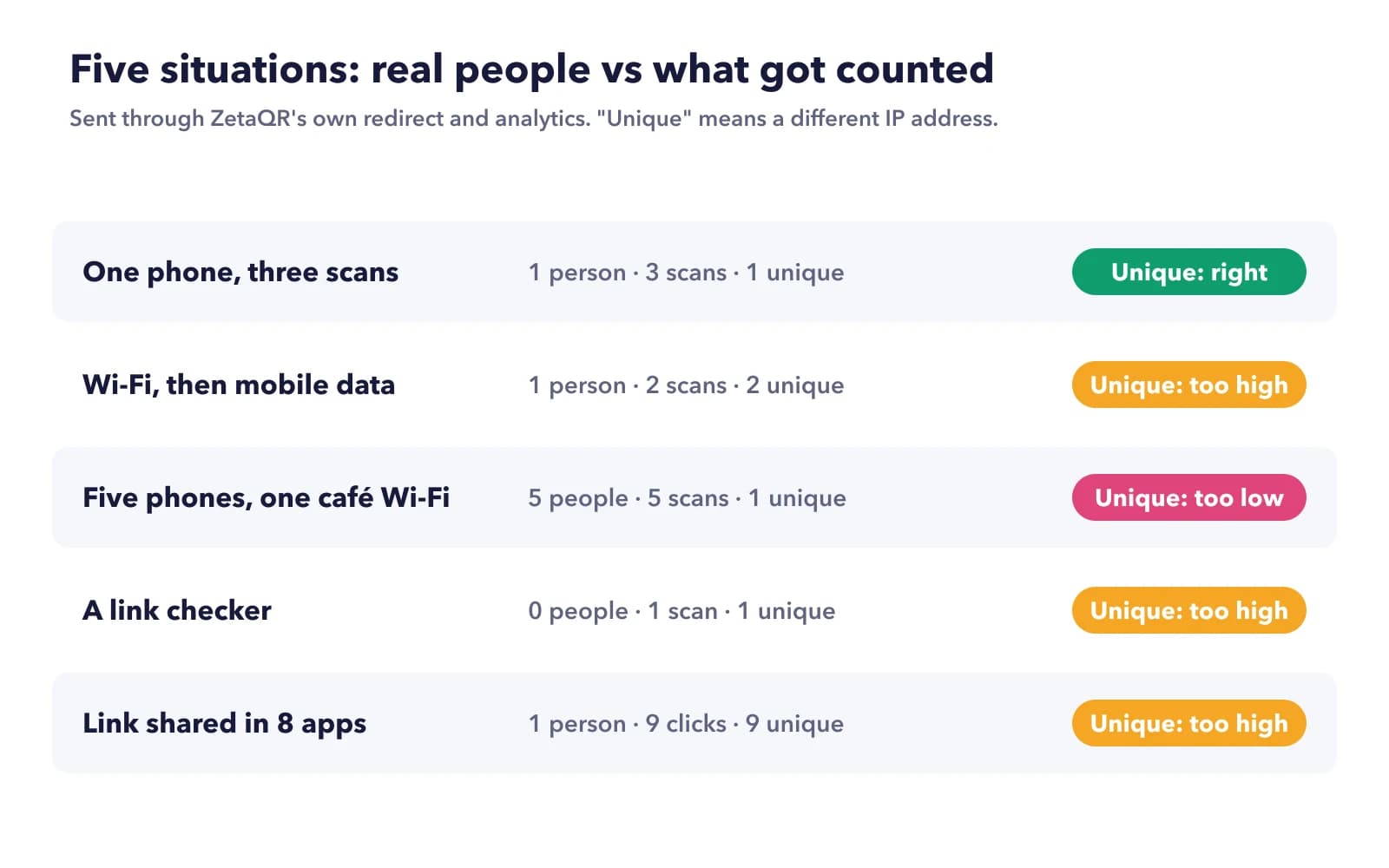
Five situations, each one something that happens to printed codes every week. A customer scans the same table tent three times. Someone scans on the shop's Wi-Fi, walks out, and scans again on mobile data. Five friends at one café table scan on the same Wi-Fi. A link checker opens the link without a person anywhere near it. And someone pastes a short link into eight different chat apps, which each fetch it to build a preview, before one person taps it.
Once the analytics had been written, we read the rows back and counted them the same way the dashboard does. One limit to keep in mind: this shows how our counter treats each kind of request. It doesn't show how often real apps fetch links, which depends on the app and on caching.
Where the Count Runs High
The same person, more than once
Three scans from one phone on one connection came out as three scans and one unique. That's the counter doing its job. Total scans is meant to count every open, and people do rescan: the page didn't load, they want the menu again after ordering, they're showing a friend.
Switching networks is different. Our Android test phone scanned once on Wi-Fi and once on mobile data, and the report showed two unique scans. To the counter, those really are two different connections. Think of a shopper who scans in the store, then again from the car park to finish reading.
Things that aren't people
A link checker sent a single HEAD request, the kind tools use to see if a link still works without downloading the page. It was counted as a scan, from a "desktop" device with an operating system of "Other". Nobody was there.
When a Link Gets Shared, Apps Count Too
This one matters most for short links and for any QR link that ends up pasted into a chat. When you paste a link into WhatsApp, Slack, LinkedIn or iMessage, the app usually opens it to build the little preview card with a title and picture. Slack documents its own fetcher, Slackbot-LinkExpanding, and says it fetches links that users post into channels.
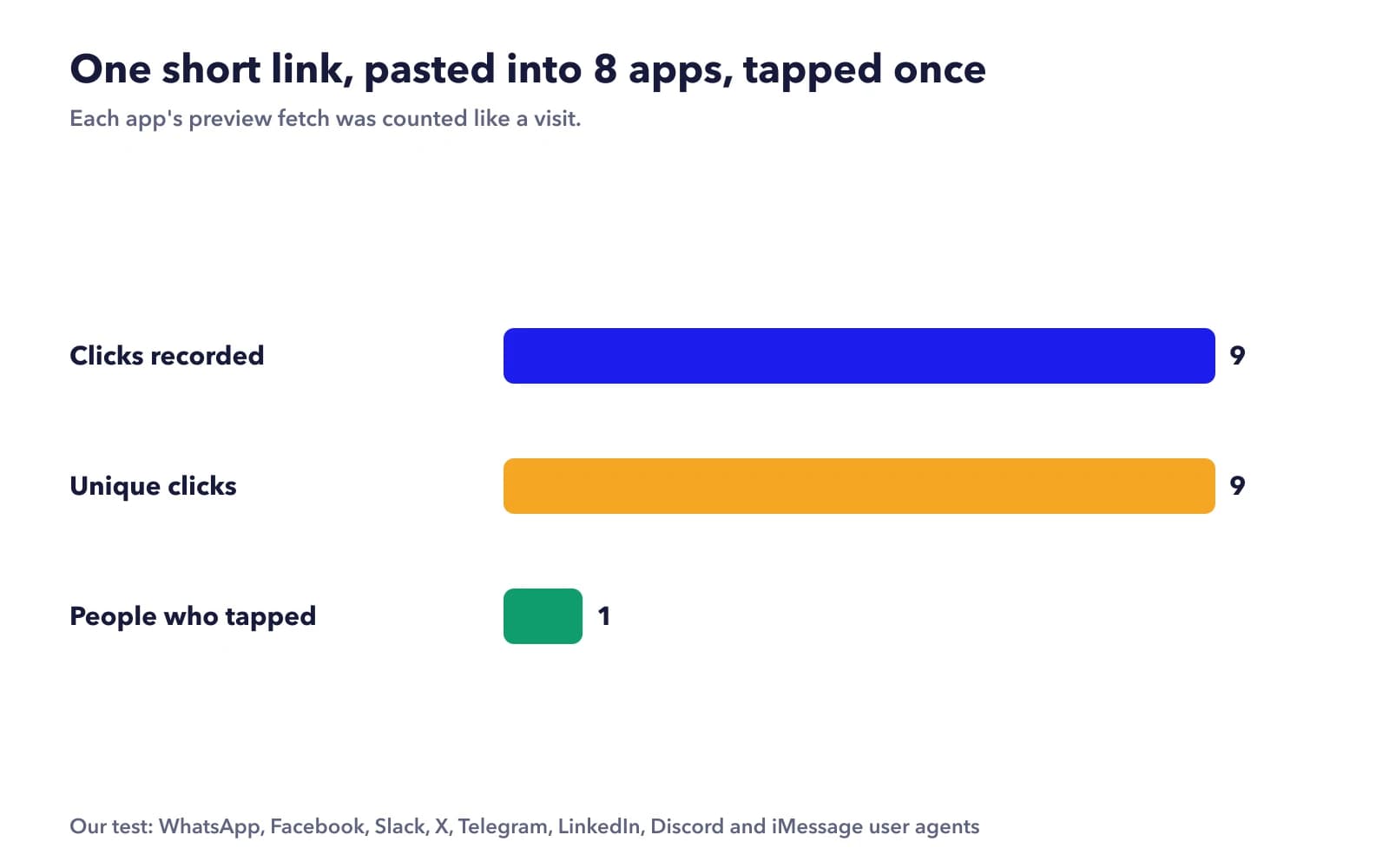
We sent one fetch each with the user agents of WhatsApp, Facebook, Slack, X, Telegram, LinkedIn, Discord and iMessage previews, then one tap from a real iPhone. The report showed nine clicks and nine unique clicks. The real number of people was one.
Most of the preview fetches were easy to spot afterwards, because they showed up as "desktop" with an operating system of "Other". The iMessage one wasn't. Its user agent looks like Safari on a Mac, so it was recorded exactly like a person on a laptop. There's no way to tell it apart from the report.
Real life is a bit gentler than our test. Slack, for one, says it caches previews for about 30 minutes, so pasting the same link twice in a channel shouldn't mean two fetches. But a link shared around a few group chats can easily rack up preview "clicks" before anyone taps it.
Where the Count Runs Low
Five different phones, an iPhone, a Pixel, a Galaxy, another iPhone and a Redmi, scanned on one café Wi-Fi. The report showed five scans but only one unique scan, because every phone left through the same router with the same public IP address.
That's normal for any shared connection: a restaurant, an office, a hotel, a school, a conference hall. Mobile networks do something similar at a much bigger scale. Many carriers use carrier-grade NAT, which the Internet Engineering Task Force describes in RFC 6888 as a way to share the same IPv4 address among several subscribers. So two strangers on the same carrier can look like one visitor.
Put the two together and the unique count can run high and low at the same time, in the same report. It isn't a precise headcount, and it can't be one. It's a rough middle ground between "every open" and "every person".
What ZetaQR Doesn't Filter Today
We're writing about our own counter, so here it is plainly. ZetaQR doesn't currently filter out link previews, link checkers or other bots. Every request that reaches the redirect is counted, and unique scans are based on IP address alone. Everything in the test above happens in real accounts.
Some tools do try to remove bot traffic, usually by matching known user agents. That catches the obvious ones, like most of the preview fetchers in our test, but not something like the iMessage preview that looks like an ordinary browser. No filter makes a scan count into a people count.
How to Read Your Numbers Anyway
None of this makes scan counts useless. The errors are much the same from week to week and from one code to another, so comparisons hold up better than raw totals. A few habits help:
- Compare codes and weeks, not absolute numbers.
- Give anything you share online its own short link, so chat previews don't land in your print code's count.
- Check the device breakdown. For a printed code, a lot of "desktop" or "Other" usually means something other than phones opened the link.
- Expect the unique count to run low where people share Wi-Fi, like restaurants, offices and events.
- If you need a real headcount, count something only a person does, like a form sent from a landing page.
And when the scans don't match Google Analytics, that's a different gap with its own reasons, which we covered in our guide to UTM tags for QR codes.
Frequently Asked Questions
If someone points their camera at the code but doesn't tap, is that a scan?
No. The counter only sees requests that reach the redirect, so a code that showed up on someone's camera screen and was never opened doesn't count. A scan in your report always means the link was actually opened by something.
Why do I have scans before the code was even printed?
The likeliest candidates are your own test scans, colleagues checking the proof, and link previews from emailing or messaging the link around. Those early scans tell you nothing about customers, so start your comparisons from the day the code went up.
Can I remove bot scans from my report?
Not inside ZetaQR today. What you can do is keep them from mixing in: use one code for print and a separate short link for anything shared online, and keep an eye on the device breakdown for desktop or Other traffic on a printed code.
Should I report total scans or unique scans to my boss?
Pick one and stick with it, so this month compares fairly with last month. Total scans is simpler to explain ("the code was opened this many times"). Unique scans sounds closer to people, but say it's based on connections, not individuals, so nobody treats it as an exact headcount.
Does the same problem affect short link clicks?
Yes, and usually more so. Short links are made to be pasted into chats and emails, so they meet preview fetchers far more than a code printed on a poster does. The unique click count is also based on IP address, with the same shared Wi-Fi and network-switching effects.
Pick One Number and Watch It Move
Choose the count you'll report, give shared links their own short link, and compare this week with last week. If you want to see where your scans really come from, open one code's report and look at the device breakdown first. It's the quickest way to spot opens that weren't people.
Related Topics
- #qr-code-scan-count
- #unique-qr-scans
- #qr-analytics-accuracy
- #link-preview-bots
- #short-link-click-tracking
ZetaQR Team
EditorialWriting on dynamic QR code technology, physical-to-digital attribution, and print campaign telemetry at ZetaQR.